Relink Bitmaps

Download Relink Bitmaps v2.01
(Self-installing .mzp file, just run this script via:  ”Maxscript->Run script”)
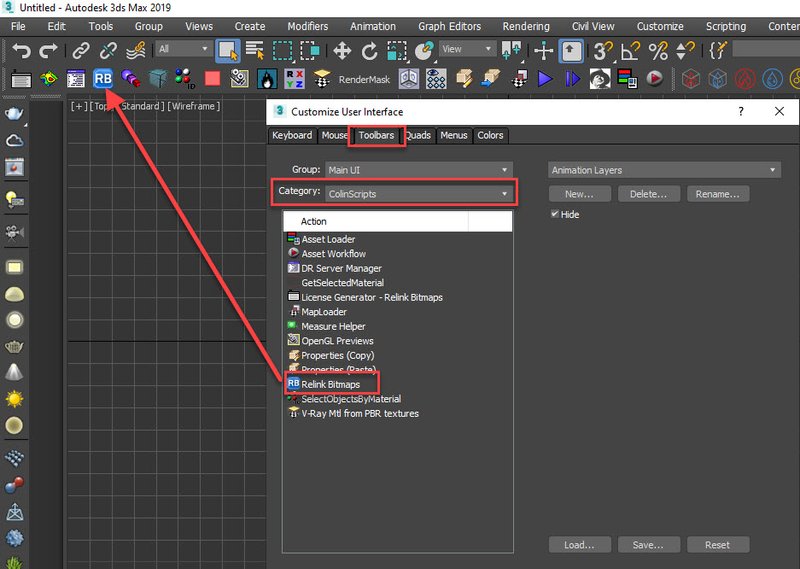
Vista_Logo_Icon Vista Users: You might have to right-click your 3dsmax icon and “Run as Administrator” to install.

Friends/Community,
I’m am currently looking for full-time/part-time opportunities in game development/scripting/archvis.

Please check my recent work portfolio at http://www.colinsenner.com and my current resume here (pdf).

This tool is available to the community for free, but I kindly request if you see the value in time this tool saves you, that you donate whatever you can to help me pay off student loans.  Every donation helps immensely.  I do however understand that we’re all in this mess somehow and I understand if you aren’t able to donate immediately at this time.  To donate simply click the “Donate!” button on the script.  I am suggesting $4.99 for an individual, but whatever you can spare will insure the future development of this script and updates.

Tested thoroughly with (32-bit and 64-bit):   Max 2010, Max 2009, Max 2008, Max 9 (service pack 1+)

Features:

  • All 3dsmax supported Bitmap Texture types
  • (new) Relinks Mental Ray Proxy files
  • (new) Relinks VRay Proxies (.vrmesh)
  • (new) Relinks VRayHDRI files
  • (new) Relinks IES files (including VRayIES files)
  • (new) Automatically checks for script updates and new versions
  • 250% speed increase from previous versions
  • Command-line mode available for automating repetative tasks (see documentation below)
  • Configurable default user options saving button clicks and wasted time

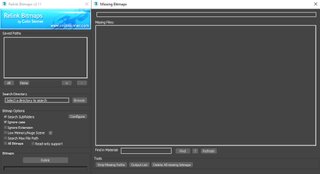
UI Screenshot
Screenshot

Download Relink Bitmaps v2.01
(Self-installing .mzp file, just run this script via:  ”Maxscript->Run script”)
Vista_Logo_Icon Vista Users: You might have to right-click your 3dsmax icon and “Run as Administrator” to install.

Just a quick thank you to Christopher Grant at Scriptspot, and the users who have shared their time and ideas (and donations) to make this script better:   brittnell, hongxu, fajar and others!

As always, thank you for everything and be well,
-Colin

Documentation:

To reset the configuration .ini file in the Listener window (Maxscript->MAXScript Listener) type and hit [enter]:

resetConfig()

To reset the position of the Relink Bitmap’s dialog window (in case it gets stuck off screen) type:

resetPosition()

Relink Bitmaps has the ability to run automatically via the command line, here is the syntax:

sceneRelinkBitmaps searchArr ignoreCase:[t/f] recursive:[t/f] undoOn:[t/f] lowMemory:[t/f] progress:[progressBar]
/* sceneRelinkBitmaps – Relinks bitmaps in the current scene
append to returnMissingBitmaps() function for adding more kinds of assets to relink
searchArr: an array of directories to search
ignoreCase: true or false
recursive: true of false
undoOn: true or false
lowMemory: true or false
progress: progressBar link to update progress */

/* sceneRelinkBitmaps – Relinks bitmaps in the current scene
searchArr: an array of directories to search, ie. #(”C:/maps”,”D:/maps”)
ignoreCase: true or false
recursive: true of false
undoOn: true or false
lowMemory: true or false
progress: progressBar link to update progress, will update the .value in this while it relinks */

If you’re having problems with the script run it and in the listener type:

setDebugMode on

and send me the output and what you did so I can track it down for you asap

24 Comments »

 
  • Brittnell says:

    First! (sorry, couldn’t resist)

    This is awesome Colin.
    Thanks SO much for your continued work on this!

  • colin says:

    Thanks Britt, it’s only fitting you were the first to comment. Shoot me an email by the way (you don’t allow people to contact you via scriptspot. I’m in Chicago right now, but I’ll reply sometime Saturday when I get back.

  • Mitch says:

    Colin,

    Great site and nice Script!! The only problem I seem to have with it and its a big one is that the window doesn’t open up enough for me to see the “relink” button. I’m currently running 3ds Max 2009 and Windows XP SP3.

    Regards,

    Mitch

  • colin says:

    Hey Mitch, you’re the second user with that problem. I believe it’s due to your windows appearance settings being larger than the default which is what I coded it for. If you want to send me a screenshot I’ll take a look, another user was having this problem on Scriptspot and made me aware of it. I’ll send you an email.

  • Mitch says:

    Colin,

    “I believe it’s due to your windows appearance settings being larger than the default which is what I coded it for”

    That’s it 100% correct!! When I lower my font size it fits fine. However with my resolution set to its max the “normal” font size forces me to put on my glasses. Also to note with the same settings on the same computer your script works fine in 2010. I hope this information helps.

    Regards,

    Mitch

  • Fullfat says:

    Great Script, been using the previous version a lot. Love the new relink Vray Proxies.

    I have a problem with installing the latest version. I can run the ‘Relink Bitmaps.mse’ file and get it up and running but the .mzp file doesn’t exsist in the zip folder that I downloaded from Scriptspot. All I have is a mzp.run file that isn’t recognized as a valid file format. Therefore I can’t get a full install and so don’t have the toolbar button image.

    Hope you can help…

  • csenne20 says:

    The whole installer is named “Relink Bitmaps v2.0.mzp” which is just a .zip file renamed to .mzp. Maxscript will automatically take care of the unzipping and everything for you, all you have to do is within Max goto Maxscript -> Run Script, and click on the “Relink Bitmaps v2.0.mzp” file and it’ll install itself, no need to rename the .mzp to .zip or it won’t know what to do! Give that a try and let me know how it goes.

    -Colin

  • [...] On the 3dsmax side of things, there are a couple scripts included, the pyAssetbrowser.ms script is a Struct including some simple functions for things like importing, merging, converting to vrmesh, billboarding image maps, collapsing, re-linking maps using a few stripped down bits of modified code from an older version of ColinSenner’s Relink Bitmaps script [...]

  • 3dman says:

    Why compile the scripts when you’re giving this for free ? ..that makes me a little concerned. Also, using an auto updater may seem cool, but what happens if you break something by mistake one day ? eh ?

    ..just simple, valid concerns.

  • csenne20 says:

    Good questions.

    Why compile the scripts when you’re giving this for free ? ..that makes me a little concerned.

    Simple, the scripts are encrypted because I’ve included a “Donate” screen, the donate screen is just a bit of a nag, and if users decide to donate I’ll remove the nag screen via a license file. If the scripts aren’t encrypted the entirety of the encryption algorithm would be taken, and the donate nag screen could be removed simply by commenting out the line that generates it. I’m not exactly sure why you’re concerned however.

    Can malicious code be executed from maxscript?
    The answer is ‘Yes’, absolutely. However I’m sure you’ve run non-encrypted scripts without checking for malicious code, trusting the author to not destroy your files/registry etc.
    This script is very popular on ScriptSpot.com, and I’m sure it wouldn’t be one of the highest rated if I was destroying people’s computers.

    Also, using an auto updater may seem cool, but what happens if you break something by mistake one day ? eh ?

    I haven’t broken anything yet :) Also if the website goes down or anything, it will be completely transparent to users, I made sure to accommodate offline-only users as well.

    I hope this answers your questions,
    Colin

  • John Mochelle says:

    Hey man, thanks for the script update. I use this little baby a bunch. It has saved me a lot of time. I sent you some through PayPal. Enjoy. Get a beer or something.

    Quick question. Seems you have encrypted it now…,thats cool..i understand why, is there a way to put this baby into a batch file?

    I was using one of your last versions in a batcher i put together….

    anyway, good luck. thanks a ton for this. hope you get that job you want, need, love …etc. thanks again.

    jack

  • csenne20 says:

    Jack,
    This script is completely command-line usable. Check the page for Command line options and it’s very easy to batch it over multiple files etc, let me know what you need and I’ll be more than happy to show you how to do it!

    -Colin

  • Dan Black says:

    I donated $4.99 but the pop up to “donate” will not stop popping up when I open Relink Bitmaps. Could you tell me how to stop it?

  • Pierre Auriac says:

    Hi Colin,
    I’m trying to use your script but no bitmap appear to be missing and a message says “impossible to convert . undefined to type Filename.
    I have to mention that bitmaps are effectively missing.
    Do you have any explanation?
    Thanks,
    Pierre.

  • Duncan says:

    Hi can this script replace tiff textures with jpg textures ?

  • fajar says:

    Hey colin , I didn’t know you say my name here….how glad I’m….thank!! lol…dooor….. youre the best man!!
    What’s new in 2.01 version?

  • csenne20 says:

    v2.01 fixes a bug in v2.0 where an undefined bitmap filename caused an error. Pretty serious bug that I’m surprised wasn’t found earlier, it’s fixed with this version. The changelog that comes up when the script detects it needs updating is complete with all fixes and updates. I’m including new functionality with the next version coming out in a couple of weeks, some minor tweaking and speed increases and things to make everyone’s life even easier. The script will notify you when there’s a new version available when you run it and it’ll be available on this site first.

    Thanks for everything as always Fajar, I hope you are well. Please let me know if you have any awesome ideas for improving the script further and let all your professional colleagues know about it so I can grow my user base!

    -Colin

  • Wasib says:

    Hi Colin, I used to use ur script in max 2009 all the time. Now when i run it in max 2010, it says unable to create .inifile, with its location ofcourse, c/programfiles/ etc.Please help.
    thanx.

  • csenne20 says:

    Please check your email, looking forward to getting this sorted out for you.

    -Colin

  • vislaw says:

    Colin,

    We haven’t used your script yet but we will send you a donation as soon as we do. I have a question (forgive me if it seems lame). I understand that your script will allow one to locate materials and relink them, but how do you simply delete or get rid of a missing material? Do you have to track down where it is being used in the scene and delete the bitmap file from the material? Surely there is an easier way? I’ve got about a dozen missing map dialogs coming up and don’t know how to get rid of them.

    THANKS! Like I said, we WILL send you bucks as soon as we install.

  • Thor Iversen says:

    Hi there!

    I got a problem when i tried to run the script in 3ds max 2010 SP1 This is what i got –Complete error: Unable to create copy/move destination directory:

    Please help, thanks

  • kavi says:

    hi coiln great tool! but does it work on windows7 ?

  • Louis says:

    Hi All,

    I’m facing a missing map and material when i save it from 1 computer and move into another computer.Is anyone can solve my problem coz really make me headache here.
    1.What should i do to prevent this happen?
    2.How do i save the material together so that in others computer can open as well?
    3.Is there a script to solve my this problem?

    Thank you very much.

  • Fido says:

    Hi,

    First thank you for this amazing tool and Happy New Year.

    I tested your tool on windows 7 it’s works fine we have to run max with Administrator right to save paths.

    The only thing missing on Max 2010 it’s containers relink. I hope you will make it.

    Thanks again.

    Eddy.


Leave a Reply

XHTML: You can use these tags: <a href="" title=""> <abbr title=""> <acronym title=""> <b> <blockquote cite=""> <cite> <code> <del datetime=""> <em> <i> <q cite=""> <strike> <strong>